ApexMouse is the lightweight native macOS software application (.dmg) that upgrades any physical mouse into a precision powerhouse. Experience ProMotion 120Hz butter-smooth scrolling, zero-lag 1:1 cursor acceleration bypass, magnetic drop shelf stash, and custom gestures on Apple Silicon & Intel Macs.
More than just a scroll smoother. ApexMouse replaces half a dozen paid utilities with a unified, native, ultra-lightweight Swift engine.
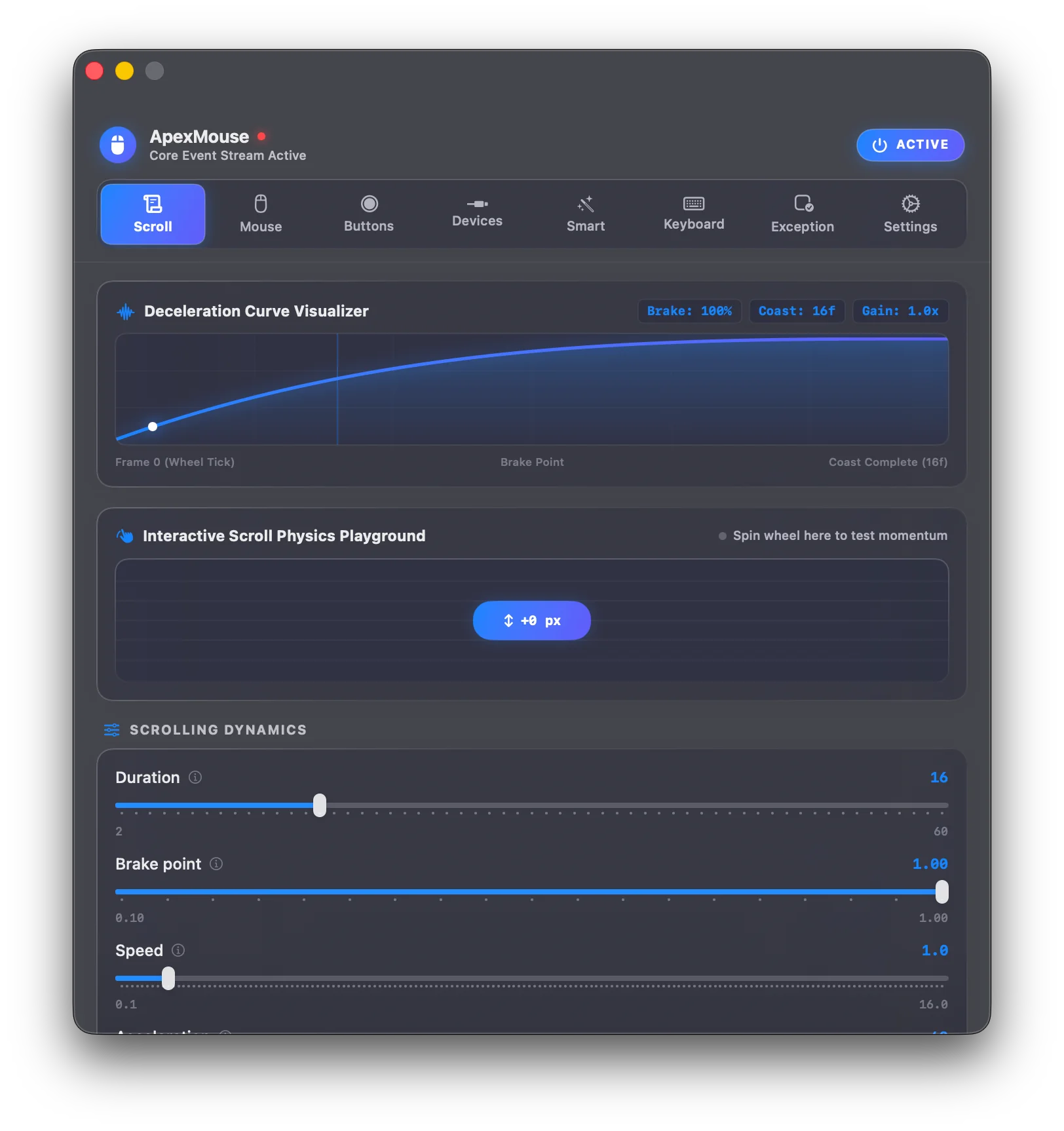
Discrete, clunky scroll wheel clicks are transformed into continuous, momentum-based sub-pixel animation synced with your display's native refresh rate (60Hz or 120Hz ProMotion).
Bypass macOS non-linear curve restrictions. Experience raw 1:1 precision mouse tracking for competitive gaming, design, and 3D modeling.
Remap buttons (B3–B8), chords, or hold any button to draw shapes on screen with customizable glowing ink trails and real-time HUD recognition to trigger 30+ native macOS actions.
A floating liquid-glass pocket attached directly to your cursor. Simply drag any file, image, text snippet, or URL and wiggle the mouse (shake-to-summon) to stash it. Travel across full-screen spaces and drop everything into Slack, Finder, or Mail with a single gesture.
Context-aware wheel interactions: Hover over the macOS Menu Bar and scroll to change volume (or hold Shift for screen brightness).
Hold an extra button to summon a circular quick-action dial right at your cursor tip. 2 to 12 configurable slices with spring animations.
Automatically distinguishes MacBook Trackpads from external mice. Trackpads maintain 100% native multi-touch gestures and pinch-to-zoom with zero conflict.
Apply unique scroll curves, inverted directions, and custom button macros for Figma, Photoshop, VS Code, Final Cut, or Games automatically.
Configure custom key substitutions (e.g. Caps Lock to Escape) and toggle Fn standard keys vs. media controls with a dedicated visual interface.
Explore how ApexMouse transforms everyday interactions into lightning-fast muscle memory.
Don't let extra mouse buttons go to waste. ApexMouse detects Middle Click (B2/B3), Side Buttons (B3–B8), and lets you map single clicks, double clicks, long holds, 4-way directional drags, and chorded wheel spins to 30+ native actions.
Hold an extra button and flick Left, Right, Up, or Down to switch desktop spaces, trigger Mission Control, or cycle windows.
Hold a side button and spin the scroll wheel to adjust volume, zoom in/out, or scrub media timelines with zero latency.
Record any complex keyboard shortcut (e.g. ⌘⇧4, ⌘⌥I, ⌃⌥Space) and synthesise it directly from your mouse.
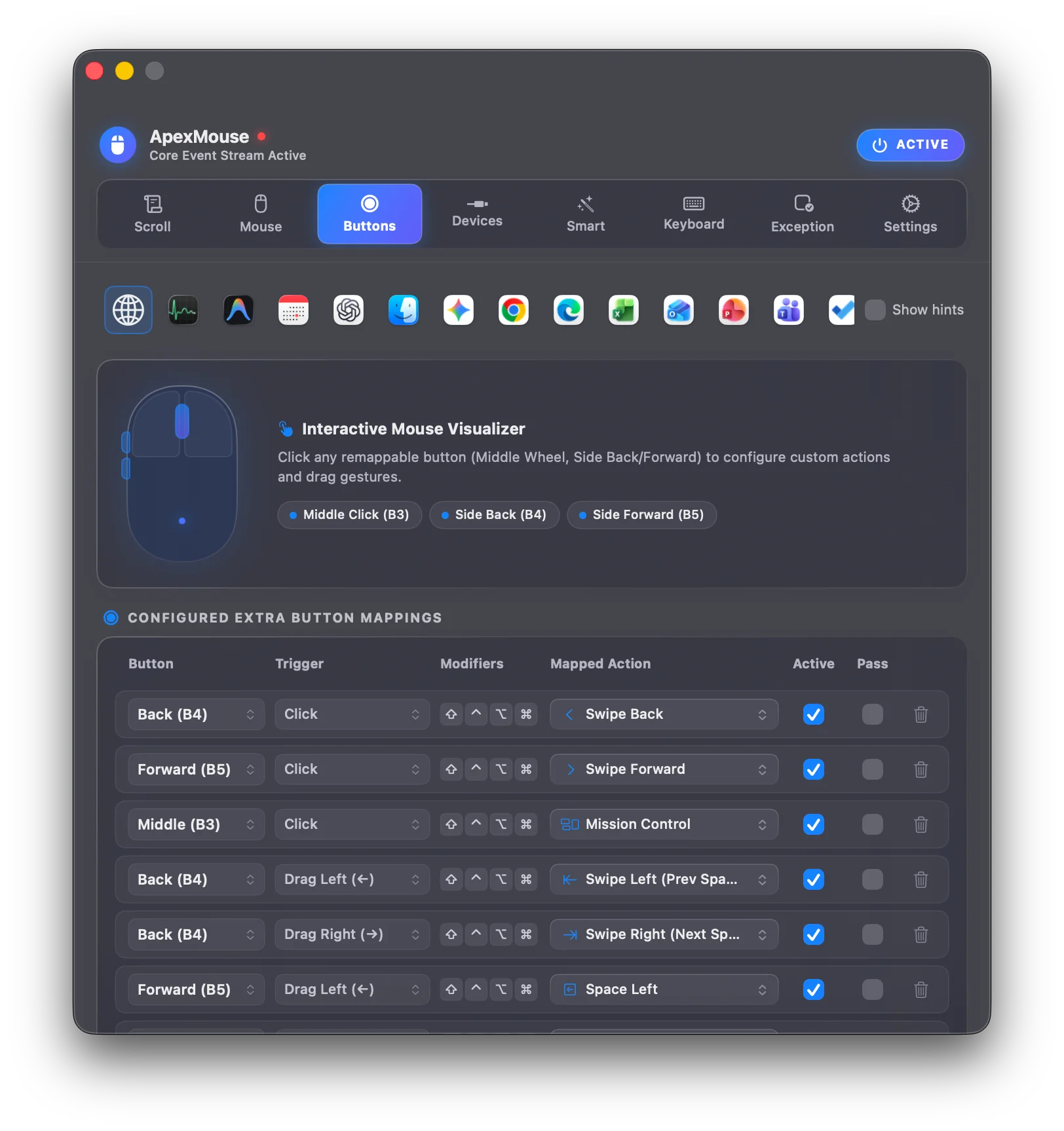
Hold any trigger button (Right Click, Middle Click, or Side Buttons) and draw shapes directly on your screen. A vibrant glowing ink trail tracks your cursor, while an intelligent live HUD recognizes gestures in real-time to execute macOS shortcuts, window management, and custom macros.
Customizable glow colors (Royal Blue, Purple, Emerald Teal, Coral Orange) with adjustable stroke width (1–10 pt). A floating HUD pill displays the detected shape and mapped action before release.
Instant out-of-the-box recognition for essential macOS workflows: L-Shape for ⌘W (Close Window), Checkmark (✓) for Mission Control, Swipe Left (←) for History Back, and Swipe Right (→) for History Forward.
Record arbitrary custom strokes with tolerance thresholding. Bind custom arc sweeps to scrub video forward or backward by 5 seconds in YouTube, QuickTime, or Final Cut Pro.
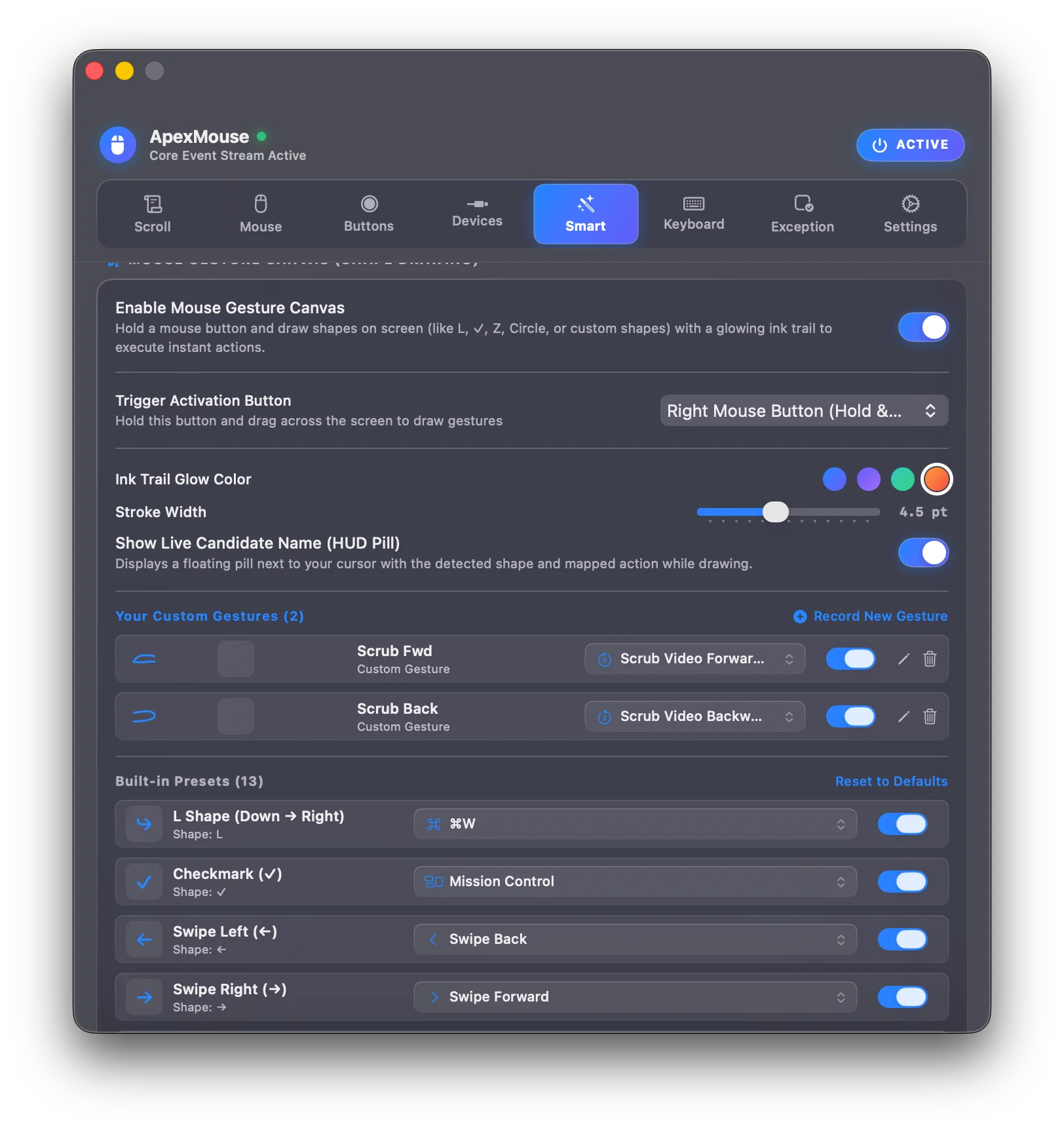
ApexMouse turns your mouse into a context-sensitive control centre. Stash files on the fly, adjust volume without opening Control Centre, and cycle browser tabs without over-scrolling.
Drag any file, snippet, image, or URL and wiggle your mouse to summon a floating liquid-glass stash pocket attached to your cursor. Drop everything out anywhere with 1 drag.
Hover cursor over the macOS Menu Bar and scroll to change system volume; hold Shift to adjust screen brightness instantly.
Hover over tab bars in Safari, Chrome, Arc, Brave, or VS Code and scroll slowly to cycle tabs one notch at a time with zero runaway skipping.
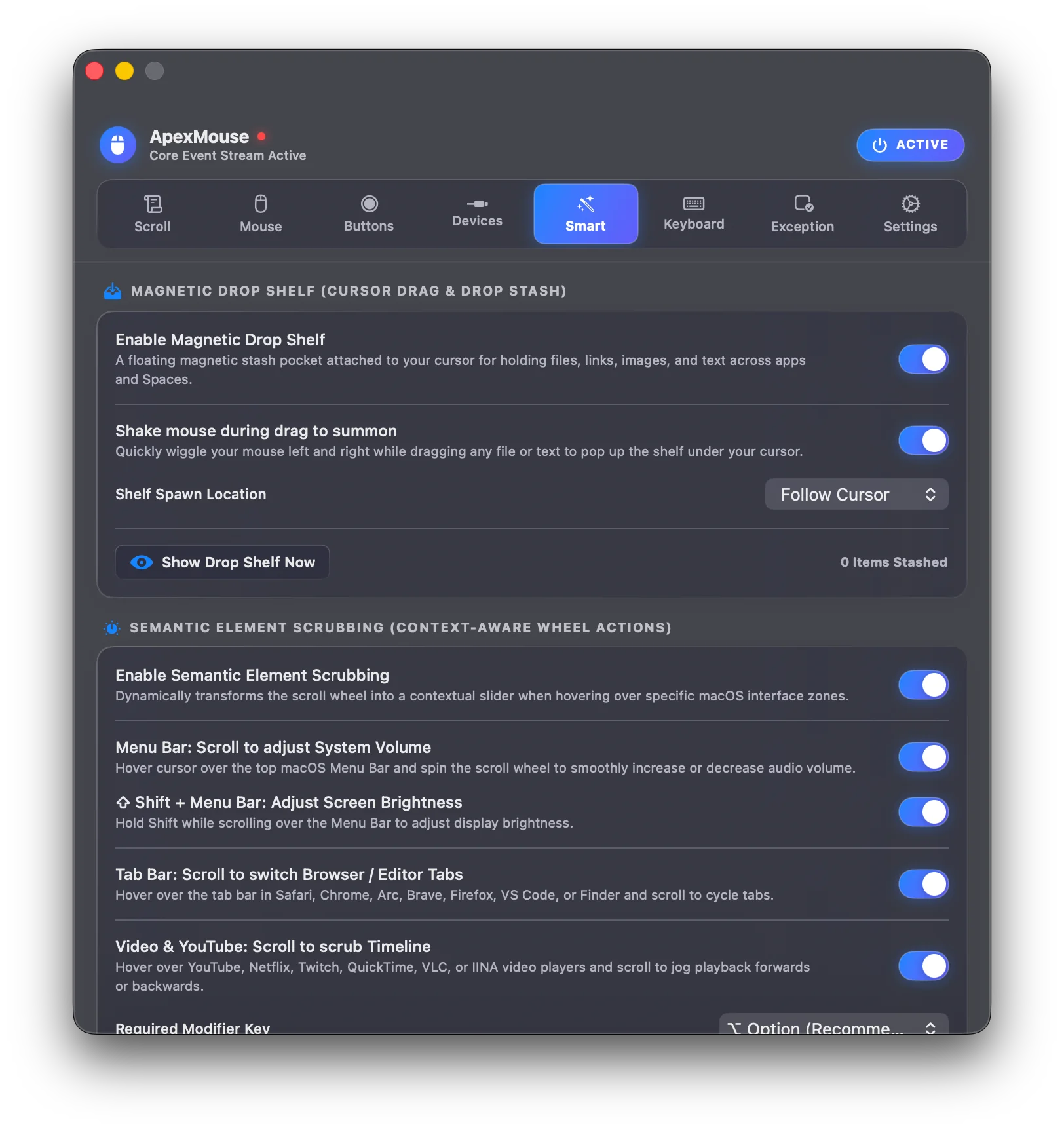
macOS forces an aggressive non-linear cursor acceleration curve that makes precision work, FPS gaming, and design feel mushy. ApexMouse speaks directly to IOKit to bypass system curve restrictions.
Raw 1:1 hardware translation eliminates cursor inertia so your physical hand movement matches screen movement with mathematical precision.
Built-in IOKit HID telemetry meter counts raw mouse movement events per second to verify whether your gaming mouse is running at full 1000Hz.
Adjust cursor multiplier deltas independently without disturbing macOS trackpad settings.
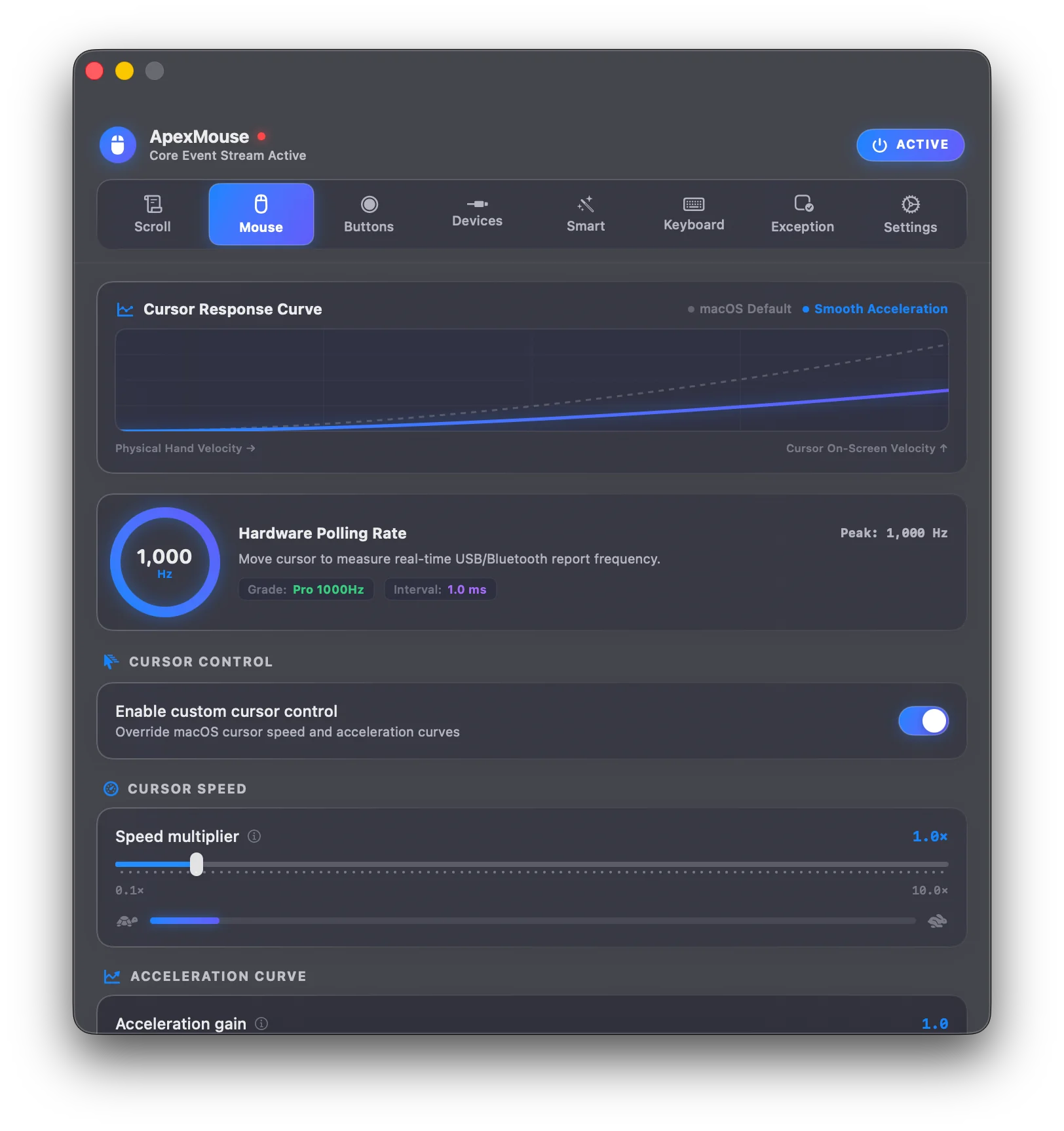
Explore the clean, intuitive settings interface designed specifically for your Mac. Click any screenshot for a full-resolution retina view.
Try 100% free for 14 days with zero restrictions. When you love it, own it for life with no recurring monthly subscriptions.
Experience every single superpower with zero restrictions and no credit card required.
For creators and power users demanding the definitive macOS mouse experience.
For professionals with multi-Mac setups or household sharing up to 5 Macs.
Prices shown exclude local taxes. Applicable sales tax or VAT is calculated automatically by Gumroad at checkout based on your billing region.
If ApexMouse doesn't make your Mac feel noticeably faster, smoother, and more productive within 14 days, simply contact us for a full 100% refund. Read full policy →
Unlike single-purpose utilities such as LinearMouse (cursor curves only) or Mos (scroll direction only), or BetterMouse which lacks integrated file staging and real-time polling telemetry, ApexMouse provides a comprehensive, unified input architecture built native in Swift. Enjoy ProMotion 120Hz CVDisplayLink momentum, 1:1 hardware curve bypass, magnetic Drop Shelf, and zero idle CPU impact.
| Feature Capability | ApexMouse | Stock macOS | BetterMouse | Mos / LinearMouse |
|---|---|---|---|---|
| CVDisplayLink 120Hz Eased Scrolling | ✓ Full 120Hz | ✕ Choppy 3-line | ✓ Yes | Partial |
| 1:1 Linear Acceleration Bypass | ✓ Native IOKit | ✕ Forced Curve | ✓ Yes | ✓ Yes |
| Live 1000Hz Polling Rate Meter | ✓ Built-in | ✕ None | ✕ None | ✕ None |
| Magnetic Drop Shelf (Shake-to-Stash) | ✓ Built-in | ✕ None | ✕ None | ✕ None |
| Semantic Element Scrubbing (Menu/Tabs/Video) | ✓ Built-in | ✕ None | ✕ None | ✕ None |
| Cursor Radial Pie Menu Dial | ✓ 2-12 Slices | ✕ None | ✕ None | ✕ None |
| Mouse Gesture Canvas & Glowing Ink HUD | ✓ 13 Presets + Custom Arcs | ✕ None | Limited drag only | ✕ None |
| Trackpad Auto-Bypass (Never Breaks Gestures) | ✓ Automatic | N/A | Manual toggle | Often conflicts |
| Idle CPU & Energy Impact | < 0.1% (Dormant) | Built-in | ~0.5 – 1.5% | ~0.8 – 2.0% |
Native for Apple Silicon (M1/M2/M3/M4) and Intel Macs running macOS Sonoma (14), Sequoia (15), or Tahoe (16+).
Standard macOS drag-and-drop installer. Open the downloaded the DMG and drag ApexMouse directly into your Applications folder.
Standalone `.zip` archive containing the uncompressed `ApexMouse.app` bundle ready to drop into `~/Applications`.
Open the downloaded `ApexMouse.dmg` and drag `ApexMouse.app` into `/Applications` or launch directly.
ApexMouse will prompt to enable Accessibility in System Settings → Privacy & Security to smooth scroll events.
Spin your scroll wheel, tune your physics curve in the menu bar dropdown, and customise buttons.
Track all improvements, performance optimisations, and updates. Built with CalVer calendar versioning.
Accessibility permission setup, Apple notarization security, self-service license recovery, and indie developer tips.
ApexMouse is officially code-signed with a certified Apple Developer ID and fully notarized by Apple's automated security verification service:
ApexMouse uses a native macOS event tap to smooth scroll momentum and detect extra mouse buttons. It collects zero keystrokes, zero mouse coordinates, and zero private data.
tccutil reset Accessibility com.apexmouse.macos
Lost your license key, or migrating to a new Mac? Look up your purchases immediately through our merchant of record, Gumroad, without waiting for email replies.
ApexMouse is independently crafted with zero venture capital, zero adware, and zero user tracking. If ApexMouse makes your daily workflow smoother and faster, consider dropping a tip in the jar!
Need help with an activation reset, want to report an issue, or have a brilliant feature suggestion for ApexMouse? Submit your message below and our lead engineer will respond directly to your email.
Everything you need to know about compatibility, permissions, security, and licensing.
ApexMouse is a 100% native macOS software utility application (.dmg installer), NOT a physical computer mouse.
You do not buy a physical mouse device from us. Instead, you download and install the ApexMouse software application on your Mac (MacBook Pro/Air, Mac mini, Mac Studio, or iMac) to control and dramatically upgrade the physical USB or Bluetooth mouse you already own (including Logitech MX Master 3S, Razer DeathAdder, SteelSeries, Keychron, or Apple Magic Mouse). ApexMouse is an independent macOS software application and is not affiliated with the ALOGIC Apex Bluetooth mouse or any physical hardware peripheral.
ApexMouse is an all-in-one native Swift utility combining 120Hz ProMotion CVDisplayLink smooth scrolling, 1:1 hardware cursor acceleration bypass, a live 1000Hz polling rate meter, a magnetic Drop Shelf for file staging, semantic element scrubbing, and a radial dial menu. Unlike Mos or LinearMouse which only handle basic scrolling or acceleration, or BetterMouse which lacks integrated shelf staging and live telemetry, ApexMouse delivers full-spectrum mouse optimization with virtually zero idle CPU usage.
Yes, absolutely. Many Mac users suffer from high battery drain and choppy scrolling caused by bulky 500MB+ vendor software suites like Logitech G HUB, Logi Options+, or Razer Synapse. ApexMouse natively handles Logitech (MX Master 3S, G502, G Pro X), Razer, SteelSeries, Keychron, and Apple mice directly at the macOS IOKit level. You get buttery-smooth momentum, customizable side button remapping, and independent X/Y DPI calibration with under 0.1% CPU usage and zero background daemons.
Yes, completely. ApexMouse is signed with an official Apple Developer ID certificate and fully notarized by Apple's security servers. When you open ApexMouse for the first time, macOS Gatekeeper verifies its cryptographic signature and checks that Apple scanned the binary for malicious software. You will see Apple's trusted verification dialog and can launch the app immediately without terminal commands or security overrides.
When macOS undergoes major system updates (e.g. updating to Sequoia or Tahoe), Apple's TCC permissions database occasionally desynchronizes app binary signatures. To resolve this:
/Applications/ApexMouse.app.
tccutil reset Accessibility com.apexmouse.macos
You can look up all your license keys and receipts at any time without waiting for support:
No! ApexMouse uses real-time IOKit HID device telemetry to isolate built-in and Magic Trackpads. Native Apple multi-touch gestures, fluid pinch-to-zoom, and natural inertia are passed through 100% untouched. External USB/Bluetooth mice get butter-smooth momentum without affecting your trackpad.
macOS requires Accessibility authorisation for utilities that modify mouse input. This allows ApexMouse to intercept mouse wheel events to apply fluid scrolling momentum, and detect extra mouse buttons for quick actions. ApexMouse requires only this standard permission to function.
Virtually zero. ApexMouse is engineered in 100% native Swift 5.10+ and SwiftUI with zero Electron or WebKit bloat. The display link only ticks when active scrolling occurs and goes completely dormant within milliseconds, consuming virtually 0.0% CPU at idle with zero battery impact.
Yes. ApexMouse is 100% native on both Apple Silicon (M1, M2, M3, M4) and Intel Macs. It runs with zero translation layer or Rosetta emulation, delivering maximum responsiveness and zero battery drain.
ApexMouse processes all mouse events and gestures 100% locally on your Mac — it never logs keystrokes, cursor positions, or visited apps. A brief internet connection is only needed to activate your license key and re-validate every few days (with a 15-day offline grace period), or to send optional crash diagnostics which you can disable in Settings.
The Tip Jar (via Buy Me a Coffee, GitHub Sponsors, or PayPal) is completely voluntary. ApexMouse is built with pride by an independent developer and contains zero ads, zero tracking scripts, and zero investor pressure. Tips directly fund purchases of specialized test mice, high-refresh displays, and continuous software maintenance for every upcoming macOS release.